

See everything.
Stay invisible.
A live AI overlay that sees your screen, hears your conversation, and answers instantly — while staying invisible to every screen recorder and meeting app.
No credit card required. BYOK forever free.
Visible to you. Invisible to them.
Same call, two perspectives. Tap the toggle to see what your meeting partners get versus what you actually have on screen.

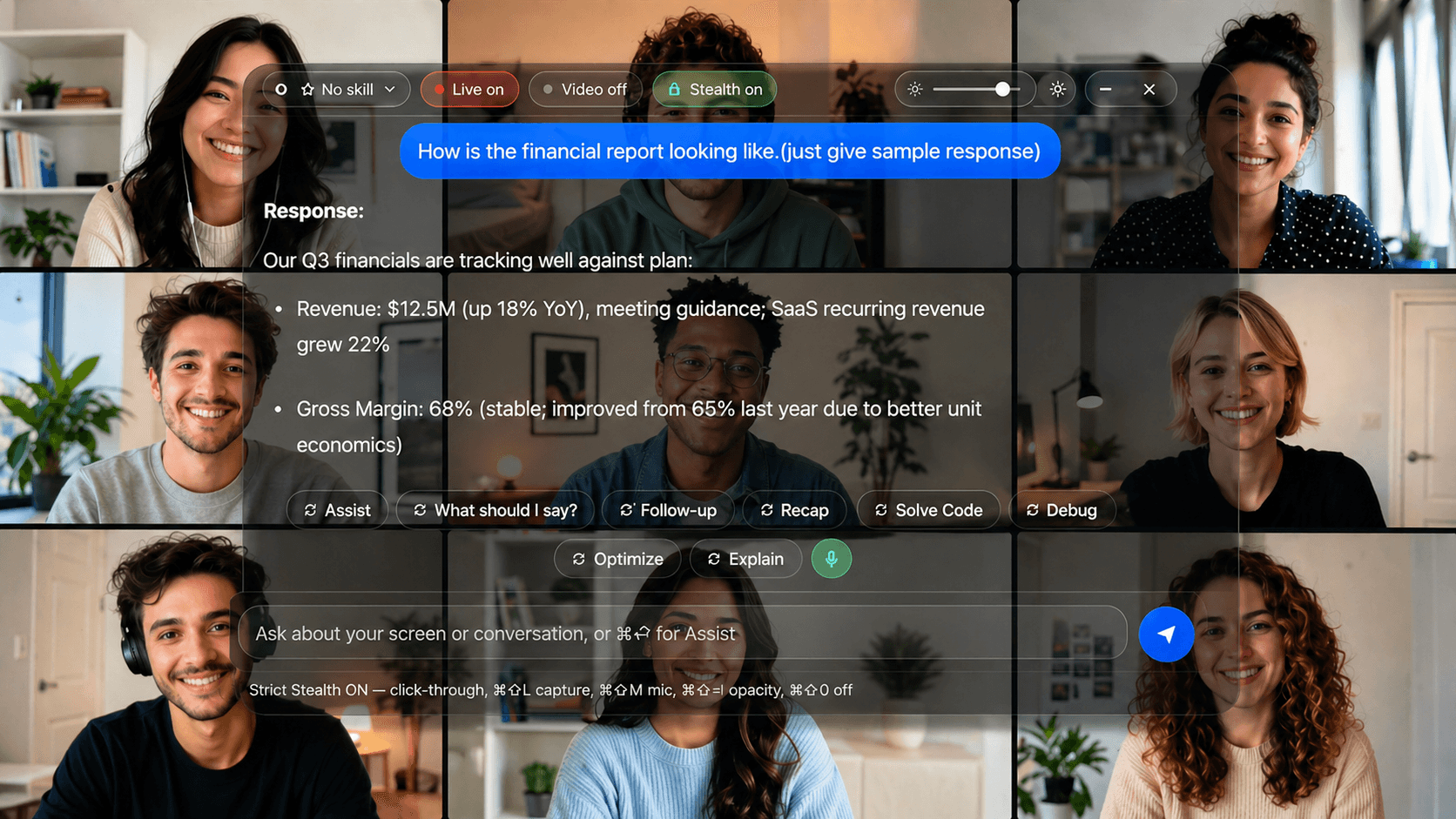
Drag the handle to compare. Same Zoom call — Veil's overlay (left) is invisible to every screen recorder, proctor, and meeting app (right).
Everything inside.
Three things to obsess over: stay invisible, pick the right brain, control it with one finger. Here's how Veil does each one.
Stealth
Veil is invisible to every screen-capture API on macOS and Windows. Banking-grade flags, not a hack.
- Hidden from every screen recorder
Veil never appears in Zoom, Meet, Teams, QuickTime, OBS, or screenshots. The overlay uses the same operating-system protection banking apps use to keep their windows out of screen capture.
- Strict Stealth mode
One toggle makes the overlay click-through, drops Veil out of any accessibility integrations, and removes it from any app-switcher inspection. Your hotkeys still work.
- No Dock, taskbar, or App Switcher
Activity Monitor and Task Manager just see a generic helper process — never the word "Veil." The app stays out of every system list a casual look would check.
- Quiet on the network
Every font and asset is bundled into the app. Veil makes zero hostname-revealing requests when idle, so it doesn't show up in your firewall or DNS logs.
AI brain
Pick the model that fits the moment. Pay your provider directly, or let us handle the keys.
- 4 providers, swappable per session
Claude (Haiku, Sonnet), GPT-4o + GPT-4o-mini, Gemini 2.5 Flash, and local Ollama (Llama 3.2 vision). Switch from Settings → Models without restarting.
- Bring your own keys, or let us handle them
Plug in your own API keys to pay providers directly, or pick a managed plan where we handle the AI and transcription billing. Either way, no monthly minimums.
- Skills
Custom AI personas with their own instructions and reference files. "Domain expert," "Code reviewer," "Math tutor" — load the right one per session.
- Knowledge base
Drop in your reference docs, technical specs, deal pages, or custom playbooks. Veil grounds answers in your actual material instead of a generic template.
- Live, streaming answers
Answers appear word-by-word in the overlay so you can read the first sentence while the rest arrives. No spinner. No waiting for a complete reply.
Audio + control
Real-time transcription, speaker diarization, and a hotkey for every action — including from your phone.
- Live transcription under 200ms
Spoken words become text in the overlay almost instantly, with smart formatting and speaker labels. Or run a fully offline mode that never leaves your machine.
- Multi-speaker mode
Capture your mic AND the system audio on separate streams. Veil tags messages "You" / "Speaker 1" / "Speaker 2" so panels are easy to follow.
- Quick-action chips
Assist · What should I say · Follow-up · Recap · Solve Code · Debug · Optimize · Explain. One tap each, all context-aware — they pull in your screen and the last 30 seconds of conversation automatically.
- Live and burst modes
Live audio auto-fires when it detects a real question. Live video re-captures your screen every few seconds. Burst grabs 3–4 frames in a row for high-context queries.
- Phone companion app
Pair your iOS or Android phone via QR code. Trigger Assist, see the answer, mute the mic — all from your phone so your laptop view stays clean for the call.
- Hotkeys that just work
Double-tap Shift to capture, double-tap to toggle the mic, and a global ⌘⇧0 emergency exit from Strict Stealth. Customizable bindings if the defaults clash with anything.
Built for these moments.
Veil is general-purpose, but here's where most people use it.
Code review + debugging
Capture a screenshot of any code, paste a snippet into Debug, or ask Optimize to refactor. Skills can pre-load your codebase conventions, language idioms, and architecture docs so suggestions match your style.
Lectures + study
Live audio transcribes the lecturer while you read. Hit Explain on anything you missed, or feed your textbook PDF as a knowledge base and ask in your own words.
Personal research
Cross-reference dense documentation, summarise long PDFs, and turn your reading into structured notes. Skills loaded with your project context means answers always know where you left off.
Live presentations
Strict Stealth makes the overlay click-through, so you can present in front of an audience with your prompter floating over the screen — invisible to attendees, but right there for you.
Your data stays yours.
We sell software, not telemetry. Three concrete promises baked into the architecture.
Bring-your-own-keys = zero server hops
On the Lifetime and free plans, every prompt goes directly from your machine to the AI provider. There's no Veil server in the path, so we literally never see what you ask or what comes back.
Managed plans don't log prompts
On the paid managed plans, we forward AI calls so you don't have to handle keys. Prompts pass through transient memory only — they're never written to a database, never appear in analytics, never in error reports.
Keys live in your OS keychain
Your API keys can be stored in the system keychain (macOS Keychain, Windows Credential Manager) instead of a plain config file. Opt-in via Settings → Storage. Even on the same machine, only Veil can read them.
Read the full privacy policy and subprocessor list.
How we compare.
Same core features. Different approach to pricing and privacy.
| Veil | Cluely | |
|---|---|---|
| Free tier | BYOK | |
| One-time buy | $99 | |
| Hidden from screen capture | ||
| Windows | ||
| Offline mode | ||
| Custom skills | ||
| Multi-provider | Claude + GPT + Gemini + Ollama | Claude only |
| Entry price | $0 | $60/mo |
Pay once, or subscribe. Your call.
The only AI overlay with a $99 lifetime option.
Common questions
How is this different from Cluely?
Veil has a free BYOK tier, a $99 one-time option, Windows support, and works fully offline with Ollama + local Whisper. Cluely is subscription-only and Mac-only.
Is it actually invisible in screen shares?
Yes. The overlay uses the same operating-system protection banking apps use to keep their windows out of screen capture. It doesn't show up in Zoom, Meet, Teams, QuickTime, OBS, or screenshots — period.
What's in the free tier?
3 days of full stealth with your own API keys, then text-only chat after that. No signup, no credit card. The free tier is how we prove the product works.
Do you see my prompts?
Only on paid managed tiers (Pro, Pro+, Team), where we proxy LLM calls. Free and Lifetime users talk directly to Anthropic/OpenAI — we never see the content.
More questions? Check the FAQ or email support@veilfox.com.
Ready when you are.
Three-day free trial with full stealth. No credit card. No signup.